




Interactive Wall Projection Games Installation Guide for Commercial Spaces
- Interactive Wall Projection Games Installation Guide
- Why install interactive wall projection games in your Activate gaming center
- About Kyda: a partner for custom installations
- Understand your site: planning a successful installation
- Choosing the right projector for commercial interactive projection
- Surface preparation and projection screen options
- Sensors and tracking systems for responsive gameplay
- Mounting, alignment and projector placement best practices
- Software setup, calibration and content scaling
- Networking, power and safety compliance
- Accessibility and user flow considerations
- Maintenance schedule and common troubleshooting steps
- Safety, insurance and liability for public installations
- Cost considerations and estimating ROI for commercial installs
- Integration examples and project workflow with Kyda
- Conclusion
- Delivering engaging, profitable interactive wall projection experiences
- Frequently Asked Questions
Interactive Wall Projection Games Installation Guide
Why install interactive wall projection games in your Activate gaming center
Interactive wall projection games installation guide helps venue owners understand how to deploy immersive projection experiences that increase dwell time, boost revenue, and diversify attractions. For Activate gaming centers and active game rooms, interactive projection is a high-impact, low-footprint addition that appeals to families, schools, corporate groups, and gamers. Using commercial-intent keywords like interactive projection games installation and commercial installation, this section clarifies business motivations and expected benefits.
About Kyda: a partner for custom installations
Kyda is a one-stop solution provider of active game rooms and Activate gaming centers, specializing in custom research, development, production, and sales of interactive and educational recreational products. Kyda’s product range—interactive LED floor systems, active reaction games, brain challenge games, horror escape games, and interactive projection games—positions the company as an experienced installer and supplier for commercial interactive wall projection games installation. Kyda’s multidisciplinary team (electronics, software, game and multimedia design, and interior design) and regional manufacturing partnerships enable tailored projects that meet local needs and commercial goals.
Understand your site: planning a successful installation
Effective interactive wall projection games installation starts with a site survey and clear objectives. Measure wall dimensions, ceiling height, ambient light levels (lux), electrical access and network availability. Determine target audience, session length, and monetization model (pay-per-play, timed sessions, membership access). These parameters drive hardware selection (projector brightness, throw ratio), sensor choice, and game content. For commercial installation, confirm local codes for wiring and public safety to ensure compliance.
Choosing the right projector for commercial interactive projection
Projector selection is central to any install. For interactive wall projection games, prioritize brightness, resolution, throw ratio and durability. In typical arcade and family entertainment centers with moderate ambient light (200–500 lux), choose projectors in the 4,000–8,000 lumen range for clear, vibrant images. Use Full HD (1920x1080) as a minimum; 4K (3840x2160) offers sharper visuals for High Quality attractions. For close quarters or low ceiling venues, short-throw or ultra-short-throw projectors (throw ratios around 0.3–0.8:1) reduce shadowing and mounting complexity. Commercial-grade projectors with sealed optics and active cooling are recommended for continuous operation.
Surface preparation and projection screen options
Wall surface quality significantly affects image clarity and tracking. Smooth, matte projection paint specifically designed for projection provides a cost-effective solution for many venues. If you need color fidelity and high gain, consider tensioned projection screens or specialty projection films applied to walls. Avoid glossy finishes that create hotspots. If interactivity uses touch or sensor-based tracking, ensure the surface is non-reflective and uniformly colored to aid sensor algorithms. Always test a small section before full surface treatment.
Sensors and tracking systems for responsive gameplay
Interactive wall projection games rely on accurate tracking. Common sensor systems include infrared (IR) cameras, stereo optical tracking, depth sensors (time-of-flight or structured light), and laser-based tracking. Each has trade-offs: IR cameras paired with IR illumination are robust in variable light; depth sensors (e.g., modern RGB-D devices) provide 3D positional data useful for gesture recognition. For large commercial spaces, multi-camera optical tracking with real-time fusion offers higher reliability. Select sensors compatible with your game software and capable of the required frame rate (ideally 30–60 FPS) to minimize input lag.
Mounting, alignment and projector placement best practices
Proper mounting ensures alignment, reduces maintenance and improves safety. Use adjustable ceiling mounts with locking hardware for commercial installations to minimize drift. Position projectors to avoid users casting shadows; wall-mounted or ceiling-recessed installation is common. Account for throw distance and keystone correction—physical lens shift and precision mounts are preferable to heavy digital keystone corrections that degrade image quality. For multi-projector setups (large walls or tiled displays), use edge blending and geometric correction tools to create a seamless image. Calibrate regularly to maintain pixel-accurate alignment.
Software setup, calibration and content scaling
Software is where gameplay and tracking integrate. Install manufacturer-provided SDKs or Kyda’s custom control software for calibration, mapping and content management. Calibration steps typically include geometric correction, mapping sensor coordinates to screen space, and color balancing. Use automated calibration tools where available to speed deployment. For content scaling, ensure game assets adapt to different aspect ratios and resolutions—vector-based assets or multiple asset sets can address this. Maintain a content management workflow to update games, schedule content, and apply promotional overlays for upselling.
Networking, power and safety compliance
Plan reliable power and network infrastructure. Use dedicated circuit protection, surge protectors and uninterruptible power supplies (UPS) for crucial components. For networked controllers and content updates, provide wired Ethernet where possible; Wi-Fi can be used for non-critical functions but may introduce latency. For public installations, ensure all wiring and mounts comply with local electrical and fire codes. Install physical barriers or signage where necessary to protect equipment from accidental damage while keeping the interactive space accessible to users.
Accessibility and user flow considerations
Design the interactive area to be accessible and encourage repeat play. Leave clear entry and exit paths, seating for supervising adults, and space for wheelchairs. Adjustable game modes or difficulty settings increase inclusivity for different age groups and abilities. Consider queuing management and integration with point-of-sale systems to streamline payment, timed sessions and membership benefits. Commercially, signage promoting longer plays, group packages, or bundled offers helps maximize revenue per visitor.
Maintenance schedule and common troubleshooting steps
Develop a routine maintenance checklist to ensure uptime. Tasks include cleaning projector filters monthly (or per manufacturer advice), checking mount tightness, inspecting cables and connectors, and updating firmware/software. Common issues: image misalignment (re-run calibration and check mounts), tracking drift (recalibrate sensors and verify ambient IR interference), and overheating (ensure ventilation and clean fans). Keep spare projector lamps (if applicable), power supplies, and replacement sensors on hand for quick swaps in commercial settings.
Safety, insurance and liability for public installations
Safety is paramount for public interactive wall projection games installation. Conduct a risk assessment during planning, ensure firm mountings and cable management to prevent trip hazards, and display clear usage instructions. Verify insurance coverage for property damage and public liability. If games involve competitive or physical actions, post recommended age and safety guidance. For revenue-generating attractions, maintain incident logs and staff training procedures to cut liability and improve guest safety.
Cost considerations and estimating ROI for commercial installs
Costs vary by scale and complexity. Small demo installations (single projector, basic tracking, simple content) can start at a few thousand dollars. Commercial, fully interactive wall systems—featuring commercial projectors, depth or multi-camera tracking, custom content and professional installation—typically range from mid-five figures upward. For large, permanent Activate gaming centers with multiple interactive attractions, budgets commonly extend into tens of thousands. Return on investment (ROI) depends on foot traffic, pricing model and ancillary revenue (F&B, merchandise). Many operators see payback in 12–36 months when the attraction drives incremental visits, higher dwell time, and repeat customers.
Integration examples and project workflow with Kyda
Typical Kyda projects start with discovery (site survey and goals), design (hardware selection and UX), prototype (small-scale proof of concept), deployment (installation and calibration), and post-launch support (maintenance and content updates). Kyda leverages local manufacturing partners and multidisciplinary expertise to deliver customized interactive wall projection games installation that align with brand identity and commercial objectives. This structured workflow helps reduce risks and ensures fast time-to-market for Activate gaming centers.
Conclusion
Delivering engaging, profitable interactive wall projection experiences
A successful interactive wall projection games installation combines careful planning, the right hardware, robust tracking, precise calibration, and a clear commercial strategy. For Activate gaming centers and active game rooms, partnering with an experienced provider like Kyda reduces complexity and accelerates deployment. Prioritize durability, accessibility, and a content roadmap to keep the attraction fresh and profitable. With proper installation and ongoing management, interactive wall projection games can be a compelling, revenue-driving centerpiece in modern entertainment venues.
Frequently Asked Questions
Q: What space requirements are typical for an interactive wall projection installation?A: Space needs depend on projector throw distance and sensor range; many commercial setups fit within a 3–6 meter wall width and 2.5–4 meter ceiling height. Always perform a site survey to confirm requirements.
Q: How bright should the projector be for a public entertainment venue?A: For venues with moderate ambient light, choose 4,000–8,000 lumens. Brighter environments or larger screens may require higher lumen projectors.
Q: Do these systems require constant internet connectivity?A: Internet is recommended for content updates, remote monitoring, and software patches, but core gameplay can often run locally to avoid latency issues.
Q: What are common tracking technologies for wall projection games?A: Common tracking technologies include IR camera systems, RGB-D depth sensors, and stereo/optical multi-camera setups. Choose according to venue lighting and accuracy needs.
Q: How long does installation typically take?A: A basic installation can take 1–3 days; medium commercial installs commonly take 3–7 days. Larger multi-projector or customized projects may take several weeks including calibration and content tuning.
Q: What ongoing costs should operators expect?A: Ongoing costs include electricity, periodic maintenance (filter cleaning, lamp replacement if not solid-state, sensor recalibration), software licensing/updates, and content creation or updates.
Q: Can Kyda customize games and branding for my venue?A: Yes. Kyda offers custom game design, branding, and integration services to match venue themes, monetize attractions, and create unique Activate gaming center experiences.
Q: How do I ensure ADA accessibility for interactive projections?A: Ensure clear pathways, adjustable gameplay mechanics, non-visual cues where possible, and configurable difficulty levels. Consult local accessibility guidelines when designing layouts and interfaces.
Top 10 Interactive Wall Projection Games for Kids' Parties
Budget-Friendly Activate Games Equipment and Setup Checklist
What Is an Interactive Floor Projection Game? Beginner's Guide
Best active game for childrens manufacturers and supplier brands in us
For Activate Gaming Floorislava Family Fun
What is the difference of Grid and Mega Grid?
Grid just interactive floor game, smaller room size can start; Mega Grid add 20pcs Digital screen with 20pcs wall buttons, also need suggest bigger room size, more activate interesting games than Grid;
Can we just buy one game room of Mega grid room?
Yes, If you start the activate game at the first time. We have more than above 50 different activate interactive challenge game rooms for options.
For Games Grid Floor is Lava
How to pack the LED tile grid?
3pcs/carton, 45cartons/panel.
For Company
How is warranty?
Hardware is two years warranty non-human factors, software for life time(The first year is for free, pay extra software service cost extra from the second year).
How many activate game rooms Kydaplay make?
Till now, 50game rooms, still updating new….
Grid, Mega grid, Climb, ARENA ,Control ,HIDE ,Push, Pipes, Laser shooting, Hoops, Cylinder, Octopus,Strike,Flash, Cannon, KNOCK OUT, Lightning, 7 Blocks, GOLDEN GAME BRIDGE, RESTRICTED, BOMB Football, Rotating targets, Angry Bird, GENIUS, Lava Monster, Super Adventure …..
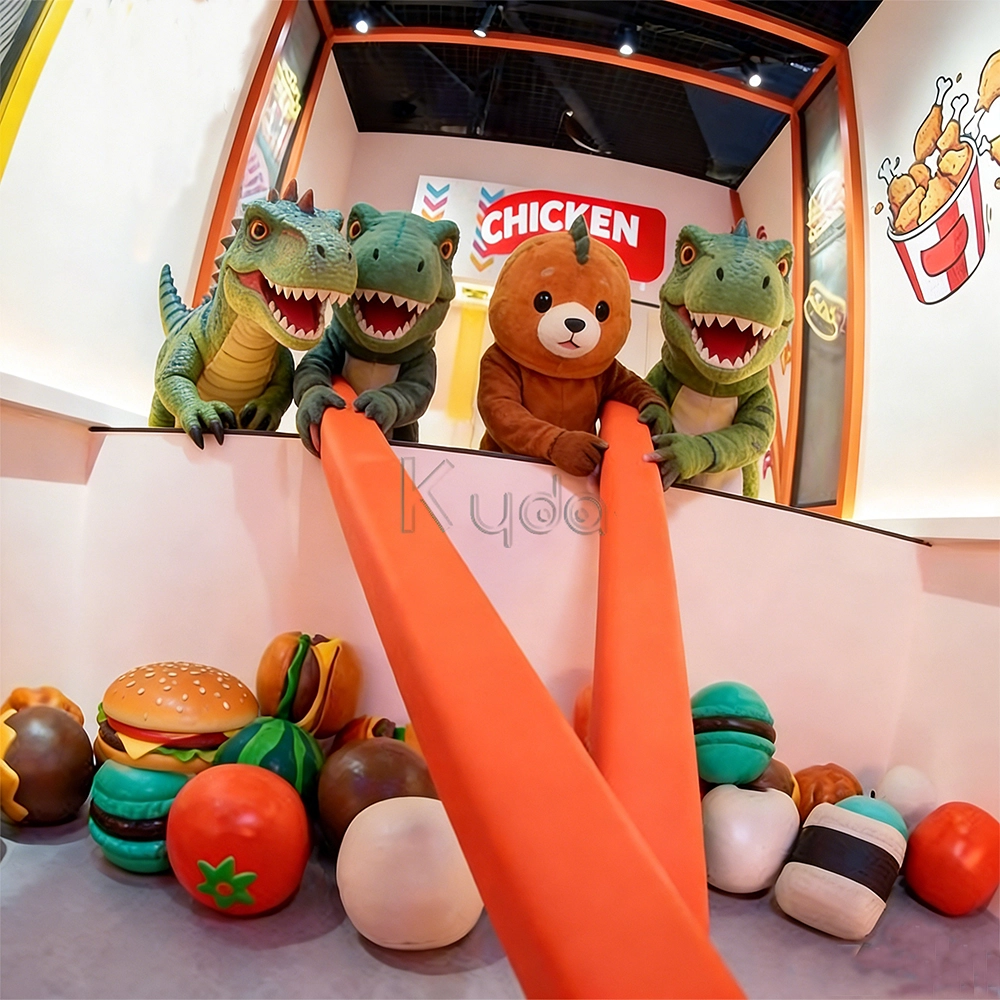
Crub Crab Giant Chopsticks Challenge Game Interactive Skill Challenge Game for Activate Game Rooms by Kyda
Crub Crab Giant Chopsticks Challenge Game is an innovative interactive challenge attraction designed for indoor entertainment centers, arcade game venues, and activate-style interactive game rooms. In this unique skill-based game, players control a pair of oversized giant chopsticks to pick up scattered snacks, toys, or prize items and place them into a collection basket within a limited time. The gameplay combines hand-eye coordination, precision control, balance, and quick reaction, creating a fun and competitive experience suitable for players of all ages.
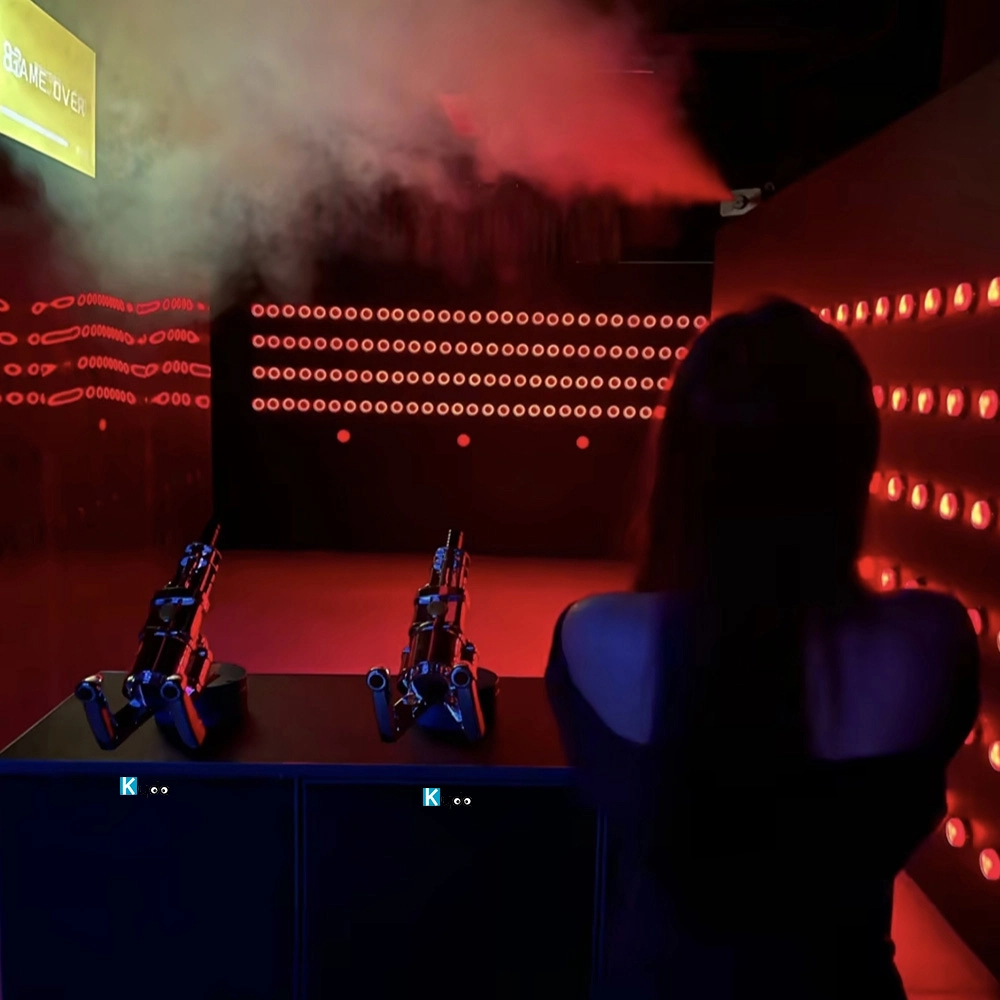
Active Reaction Laser Shooting Game Room
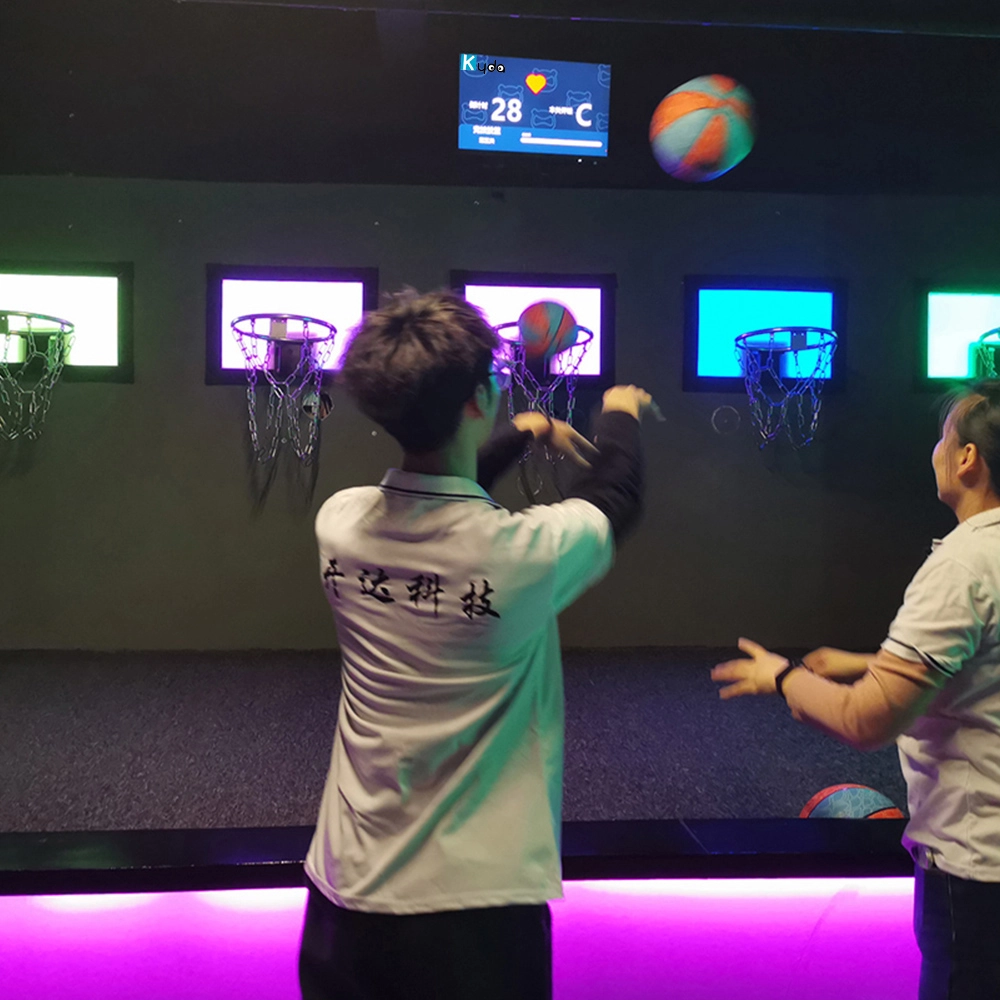
Hoops Active Game: The Ultimate Interactive Basketball Fitness Game
Elevate your basketball skills with Kyda’s Hoops Activate Game, the interactive basketball game. Perfect for basketball game rooms, Activate Hoops offers immersive fitness fun. Experience the Activate Basketball Game that combines sport and technology for active play.
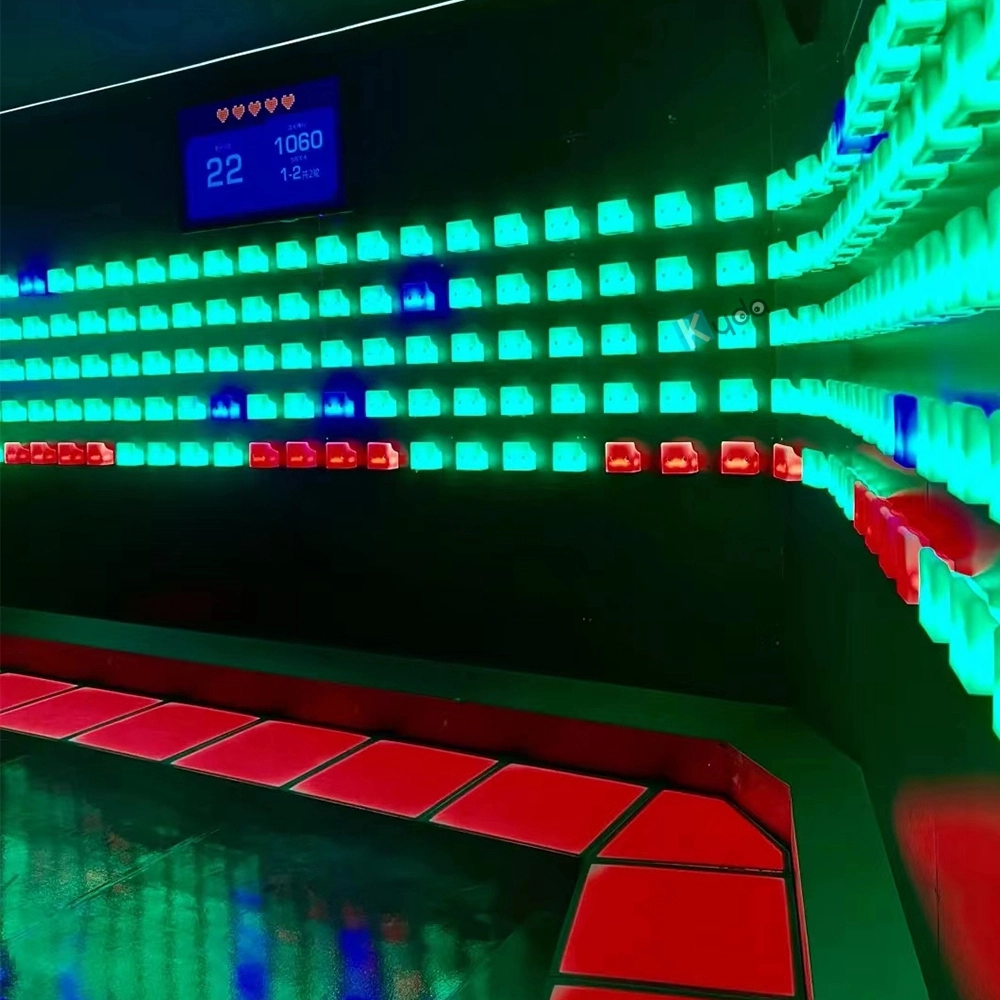
Activate Fitness Climb Game – The Ultimate Interactive LED Climbing Wall Experience
Experience the Activate Fitness Climb Game by Kyda—the interactive LED wall game. This Activate Climb Game combines fitness and fun with dynamic LED challenges, perfect for all ages. Boost agility and engagement with Kyda’s innovative interactive LED wall game today!
Let's get in touch
Email: sales@kydavr.com
Tel.: +86 188 2001 8779
Address: 501 Shixin Road, Dalong Street, Guangzhou, Guangdong, China.
© 2025 Kyda. All Rights Reserved.
 Scan QR Code
Linkedin
Ins
Facebook
Twitter
YouTube